 DOCUMENTATION
Mission Editor
The Mission Editor lets instructors author new scenarios on the airport map without programming. Use it to build local scenarios after delivery, to adapt missions when the airfield changes, and to create exercises for specialist programs.
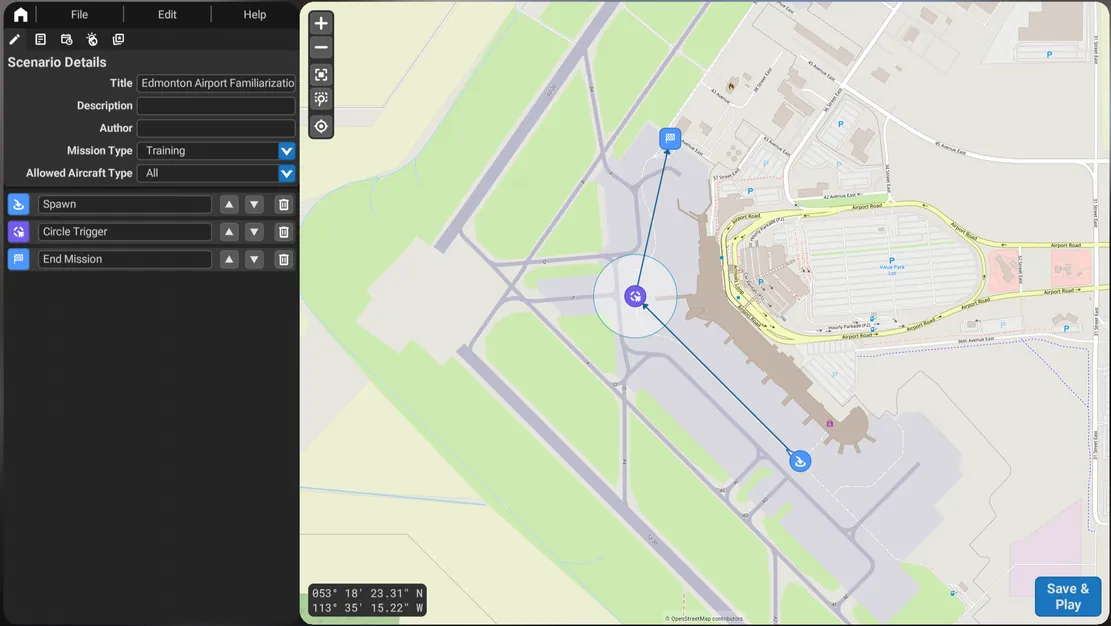
What you can set up
- Location. Route, stand, gate, deicing pad, runway or incident location on your digital twin.
- Vehicle. Any unit modeled for your fleet.
- Traffic. Moving aircraft and vehicle traffic, with triggers that start movements and create conflicts.
- Conditions. Time of day, season, precipitation, visibility, wind and surface contamination.
- Constraints. The pass and fail rules and the violations that are logged.
Examples by program
| Program | What the instructor configures |
|---|---|
| Airside driver training | Route, traffic, time of day and weather |
| ARFF and rescue | Incident aircraft placement, time, weather and traffic |
| Ground handling | Stand, aircraft type and turnaround traffic |
| Boarding bridge | Gate, aircraft type and door, and day, night, rain or wind |
| Snow removal | Season, precipitation, visibility, surface contamination and traffic |
| Deicing | Stand or pad, aircraft type, weather and traffic |
Training ahead of change
A new taxiway, a relocated stand or a construction closure is added to the digital twin, and instructors build missions on the new layout so drivers learn the new routing before it goes live.
Authoring a mission step by step
Planned content: the Mission Editor workflow with screenshots: creating a mission, placing the start position and route, adding traffic and triggers, setting conditions, defining constraints, testing and publishing to stations.
Manual section incompleteExpand this section before final publication. Pending: TO ADD